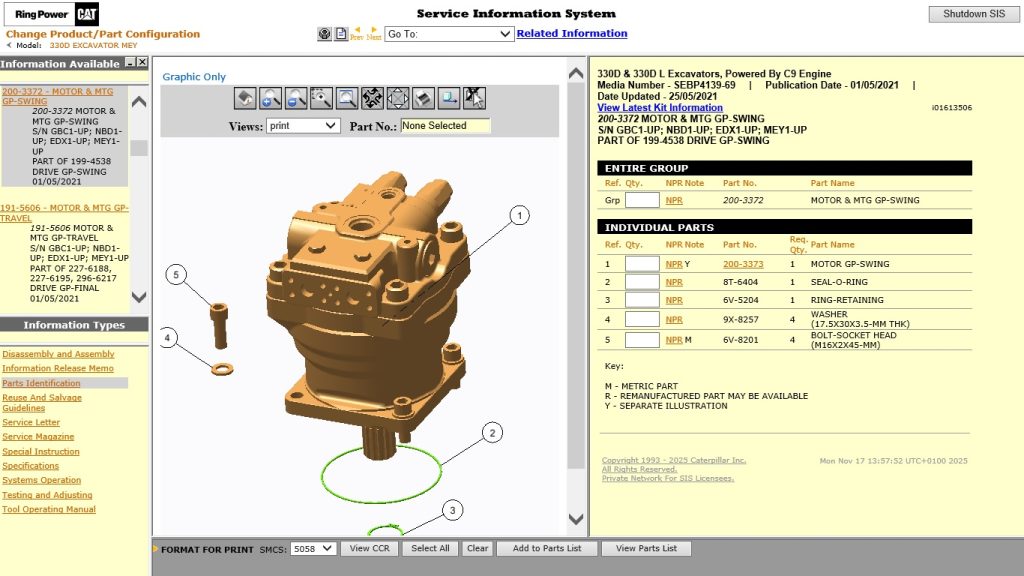
Caterpillar SIS 2022 (Service Information System) is the complete technical documentation platform for Caterpillar equipment — the digital equivalent of having every CAT service manual, parts catalogue, and wiring diagram in one place. Unlike CAT ET which connects to live equipment, SIS 2022 is an offline reference tool used alongside diagnostic software to provide the technical context that turns fault codes into completed repairs. This guide covers what SIS contains, how to install it, and how to use it effectively in a professional workshop.
What Is Caterpillar SIS 2022?
SIS is Caterpillar’s Service Information System — a comprehensive offline database containing service manuals, parts books, wiring diagrams, technical bulletins, and special instruction documents for every piece of Caterpillar equipment produced up to 2022.
What SIS 2022 contains
- Service manuals — complete removal, installation, disassembly, and assembly procedures for all components
- Parts books — illustrated parts catalogues with part numbers, supersession information, and assembly breakdowns
- Wiring diagrams — full electrical schematics for every system: engine, hydraulics, chassis, electronics
- Troubleshooting guides — systematic fault diagnosis procedures linked to specific error codes and symptoms
- Technical bulletins — field-reported issues and Caterpillar’s documented solutions
- Special instruction documents — procedures for specific repairs, modifications, and upgrades
- Torque specifications — fastener torque values for every assembly in the equipment
Equipment Coverage
SIS 2022 covers the complete Caterpillar product range from the 1970s through 2022 model year:
| Category | Equipment |
|---|---|
| Earthmoving | Excavators (300–395), hydraulic shovels, mini excavators |
| Dozers and graders | D3–D11 track-type tractors, 12–24 motor graders |
| Loaders | Wheel loaders 906–995, skid steer, multi-terrain loaders |
| On-highway engines | C7, C9, C13, C15, C18 — all truck engine families |
| Generator sets | C4.4 through C175 generator sets, all configurations |
| Marine | Marine propulsion and auxiliary engine families |
| Agricultural | Challenger MT700/800 series tractors |
System Requirements and Installation
System Requirements
- Windows 10 64-bit (recommended) or Windows 7 64-bit
- 4 GB RAM minimum, 8 GB recommended
- 80–120 GB free disk space (full database installation is large)
- 1280×800 minimum display resolution
Step 1 — Install Prerequisites
SIS 2022 requires specific Microsoft Visual C++ redistributable packages and .NET Framework versions. Install the prerequisites included in the SIS installation package before running the main installer. Missing prerequisites cause SIS to launch but fail to display content correctly.
Step 2 — Run the SIS Installer
Launch the installer as Administrator. Select your installation path — avoid paths with spaces or special characters. Choose Full Installation to include all equipment categories. The database installation is substantial and may take 30–60 minutes depending on disk speed.
Step 3 — Configure the Database Path
On first launch, SIS prompts you to specify the location of the content database. Point it to the folder where the database was extracted during installation. Once configured, SIS will index all available content — this initial indexing takes a few minutes on first launch.
Step 4 — Search by Serial Number or Model
Enter the equipment’s serial number in the search field for the most accurate results — SIS uses the serial number to identify the exact build configuration, which affects which parts and procedures apply. Alternatively, search by model name and narrow down by prefix/suffix codes.
Using SIS Alongside CAT ET
SIS and CAT ET are designed to be used together. When CAT ET reports a fault code on connected equipment, you cross-reference the code in SIS to find the relevant troubleshooting section, wiring diagram, and component location. The combination of live diagnostic data from CAT ET and the technical documentation from SIS reduces guesswork and speeds up diagnosis significantly. See our Top 5 Diagnostic Software guide for how CAT tools fit into a professional workshop toolkit. For broader commercial fleet coverage, JPRO 2025 v2 complements CAT-specific tools with multi-brand diagnostics.
Get Caterpillar SIS 2022
Complete offline database — no internet connection required after installation. Every CAT model up to 2022 covered.



