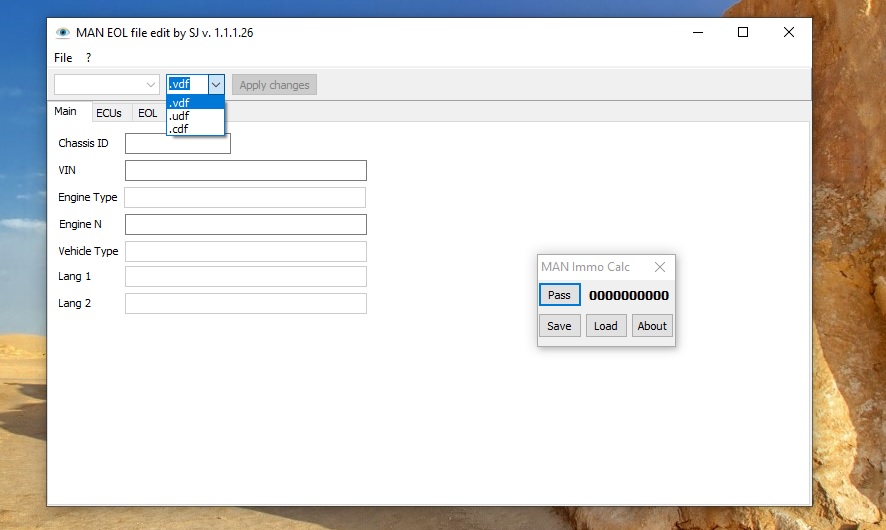
The MAN Engines ECU Programming Suite is a specialist toolkit for offline parameter calculation and ECU configuration on MAN commercial vehicles. MAN trucks use proprietary ECU security architectures that require specific tools for immobilizer work, ECU pairing, and parameter access — and this suite provides the offline calculation capabilities that workshops need to perform these operations without a live dealer connection. This guide covers what the suite contains, which MAN systems it supports, and how to use it effectively.
What Is the MAN ECU Programming Suite?
The MAN ECU Programming Suite is a collection of offline calculation and programming tools for MAN trucks and buses. It focuses primarily on the FFR (Fahrzeugführungsrechner — vehicle management computer), EDC (Electronic Diesel Control), and immobilizer systems, providing the security calculations and parameter tools that are not available in standard aftermarket diagnostic software.
Key functions included
- FFR / EDC pairing calculations — generate the correct pairing codes to synchronise replacement or second-hand FFR and EDC units
- IMMO PIN calculation — calculate the immobilizer PIN code required to initialise replacement ECUs or bypass immobilizer after component replacement
- VIN programming — write the correct VIN to replacement FFR units that require vehicle identification synchronisation
- Language configuration — set the instrument cluster and FFR language without a dealer tool
- Parameter reading and export — extract current ECU parameter sets for backup before any programming operation
MAN Systems Supported
| System | Coverage | Function |
|---|---|---|
| FFR (Vehicle Management) | MAN TGX/TGS/TGM/TGL (2005–2020) | Pairing, VIN, IMMO |
| EDC (Engine Control) | MAN D20, D26, D08 engines | FFR/EDC pairing calculations |
| Immobilizer | All MAN trucks with ELV/CAN IMMO | PIN calculation, bypass |
| Instrument cluster | TGX/TGS series clusters | Language, parameter config |
When to Use This Suite
The MAN ECU suite is most valuable in specific scenarios that come up regularly in independent workshops:
- Replacing a used FFR unit — second-hand FFR modules require pairing codes to synchronise with the existing EDC and immobilizer
- Immobilizer after key loss — when all keys are lost and the immobilizer must be reset with a known PIN
- EDC replacement on older trucks — pre-2015 MAN trucks with EBS/EDC units that cannot be recoded online
- Workshop without dealer tools — independent shops that need to perform MAN ECU work without access to MAN DIAGNOSTICS software
Installation and Setup
System Requirements
- Windows 7 or Windows 10 (32-bit or 64-bit)
- 2 GB RAM minimum
- 2 GB free disk space
- No VCI required for offline calculation functions
Step 1 — Install the Suite
The MAN ECU Programming Suite is a standalone application requiring no VCI interface for its primary offline calculation functions. Run the installer as Administrator and follow the on-screen prompts. Installation takes 5–10 minutes.
Step 2 — Enter Vehicle Data
For FFR/EDC pairing and IMMO PIN calculations, you will need specific data from the vehicle: the VIN, the ECU serial numbers (typically found on the ECU label or readable via a basic OBD tool), and the production date code. The suite uses this data to generate the correct security values.
Step 3 — Apply Calculated Values
Once the suite generates the required pairing codes or PIN, the values are entered into the vehicle via a standard diagnostic tool connected to the OBD2 port. MAN DIAGNOSTICS, a compatible J2534 tool, or some RP1210 tools can apply the calculated values to the ECU.
Important Limitations
This suite handles offline calculations and parameter generation — it does not replace a full MAN diagnostic platform for fault reading, live data, or actuator tests. For complete multi-brand commercial fleet diagnostics including MAN trucks, our guide to JPRO 2025 v2 covers brand-agnostic heavy-duty diagnostics. For VAG Group vehicles that share some ECU architecture with MAN’s bus division, see our ODIS guide.
Get MAN ECU Programming Suite
Instant digital download. Offline operation — no internet connection required for calculations.



