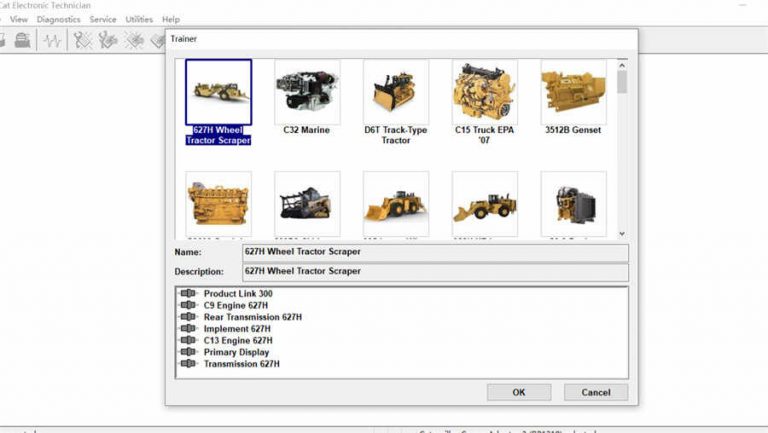
Caterpillar ET (Electronic Technician) 2019C is the official OEM diagnostic software for Caterpillar engines and equipment. Used by CAT dealers and certified service centres worldwide, it provides the deepest available access to CAT diesel engines found in heavy-duty construction equipment, trucks, generators, and marine applications. This guide covers what CAT ET does, how to install version 2019C, which adapters are required, and how to connect to the full range of supported equipment.
What Is Caterpillar ET?
CAT Electronic Technician is Caterpillar’s factory diagnostic platform. It communicates with CAT ECMs via the 9-pin Deutsch diagnostic connector and provides full access to every programmable parameter, fault code, and live data channel in Caterpillar electronic systems.
Key functions of CAT ET 2019C
- Fault code diagnostics — active, logged, and pending J1939 fault codes across all ECMs on the equipment
- Live data monitoring — all engine sensor values in real time: boost pressure, oil pressure, coolant temperature, injection timing, EGR position
- Bi-directional tests — actuate injectors, fans, throttle, and solenoids to verify component operation
- ECM flash programming — update firmware and apply software upgrades from Caterpillar’s calibration library
- Parameter programming — modify engine ratings, idle speed, progressive shift, PTO settings, and customer-specified parameters
- Event log access — review historical data snapshots captured during fault events
Equipment Coverage
| Category | Equipment | ET 2019C Support |
|---|---|---|
| On-highway engines | C7, C9, C13, C15, C18 truck engines | ✅ Full |
| Construction | Excavators (300–390 series), dozers (D6–D11), wheel loaders (924–988) | ✅ Full |
| Generator sets | C4.4, C9, C15, C18, C32 ACERT generator sets | ✅ Full |
| Marine | C12, C18, C32 marine propulsion and auxiliary | ✅ Full |
| Agricultural | AGCO / Challenger equipment with CAT power | ✅ Partial |
Required Interface
CAT ET communicates via an RP1210-compatible interface. The following adapters are confirmed working:
- CAT Communication Adapter III (317-7485) — genuine CAT adapter, best compatibility for all functions
- Nexiq USB Link 3 — widely used alternative, supports J1939 and CAT’s proprietary protocols
- Noregon DLA+ 3.0 — reliable alternative for RP1210 communication
- VXDIAG VHDI Truck — budget option, works for basic diagnostics and most programming
Installation Guide
System Requirements
- Windows 10 64-bit or Windows 7 64-bit
- Intel Core i5, 4 GB RAM minimum
- 10 GB free disk space
Step 1 — Install Interface Drivers
Install your RP1210 adapter drivers before running the CAT ET installer. Connect the adapter and confirm it appears in Windows Device Manager without warning flags. CAT ET’s setup detects available RP1210 adapters during installation.
Step 2 — Run the CAT ET Installer
Launch the installer as Administrator. Select Complete Installation to include all modules, the fault code library, and the equipment database. A partial install omits certain equipment categories. Installation takes 10–20 minutes.
Step 3 — Connect to Equipment
Connect your interface to the 9-pin Deutsch diagnostic connector on the equipment. For trucks with CAT engines, this is typically on the engine firewall or inside the cab near the A-pillar. On construction equipment, the connector is usually near the operator station or engine compartment. Turn the key to On (engine off) and launch CAT ET — it will identify the equipment and present the ECM list automatically.
Common Issues and Fixes
ECM Not Found
Verify the RP1210 adapter is correctly configured in CAT ET’s Utilities → Preferences → Communications menu. Ensure the adapter is connected to the 9-pin Deutsch port, not the 6-pin AUX connector present on some equipment.
Flash Programming Interrupted
Always use AC power during ECM flash programming. A power loss mid-flash can render the ECM unresponsive. Disable Windows Update and screen saver before starting any flash session.
For broader multi-brand commercial fleet diagnostics alongside CAT, see our JPRO 2025 v2 guide which covers CAT-powered trucks within a brand-agnostic platform. For Detroit Diesel-powered equipment, our DDDL 8.19 SP1 guide covers the equivalent OEM tool.
Get Caterpillar ET 2019C
Instant digital download. Full equipment database included — ready to install and connect immediately.



