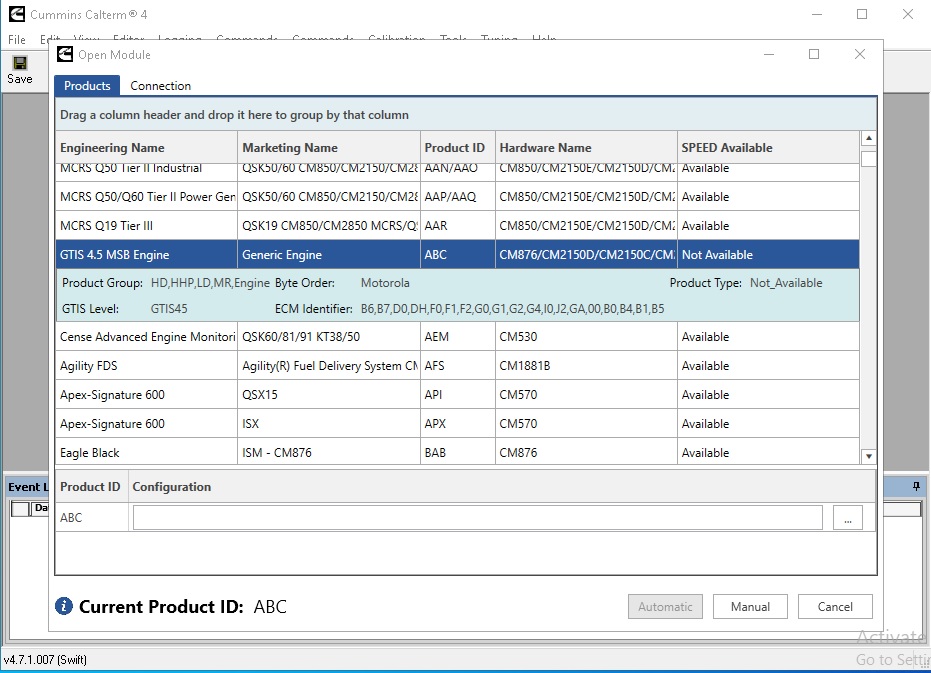
Cummins Calterm 4.7 is an engineering-level diagnostic and calibration tool for Cummins diesel engines. While INSITE handles standard workshop diagnostics, Calterm operates at a deeper level — providing direct access to ECM calibration files, real-time data at the engineering parameter level, and the ability to modify engine software in ways that INSITE’s workshop interface does not expose. This guide explains what Calterm is, who uses it, and how to get it running.
What Is Cummins Calterm?
Calterm (Calibration Terminal) is Cummins’ internal engineering tool used by their own powertrain engineers and by authorised calibration specialists. It communicates directly with the Cummins ECM at a raw calibration level, providing access to parameters, tables, and software maps that are abstracted away in the standard INSITE interface.
Calterm 4.7 key capabilities
- ECM calibration file access — read and write raw calibration files directly to the ECM flash memory
- Engineering-level live data — monitor hundreds of internal ECM parameters not visible in INSITE, including internal calculation states, lookup table outputs, and control loop values
- KG (Key Generator) integration — generate security keys required for accessing locked calibration areas
- KM4KG support — Calterm 4.7.1 includes the KM4KG key management tool for extended security access
- Fault code override — clear engineering-level fault codes and counters not accessible via INSITE
- Datalogger — high-frequency data logging across all engineering parameters simultaneously
- Calibration comparison — compare two calibration files to identify changes between versions
Calterm vs INSITE — Key Differences
| Capability | INSITE 8.9 | Calterm 4.7 |
|---|---|---|
| Workshop fault diagnostics | ✅ Full guided | ⚠️ Raw access only |
| Service resets & parameters | ✅ Yes | ✅ Yes (deeper) |
| ECM calibration file editing | ❌ No | ✅ Full |
| Engineering parameter access | ❌ No | ✅ Full |
| Security key generation (KG) | ❌ No | ✅ Yes |
| Beginner-friendly interface | ✅ Yes | ❌ No — engineering tool |
| Engine coverage | ISX15/X15/B6.7/etc. | ISX15/X15/ISB/ISC/ISM |
Who Uses Calterm?
Calterm is not a workshop replacement for INSITE — it is a complementary tool used by:
- ECU tuning specialists — modifying Cummins engine calibrations for performance, fuel economy, or application-specific requirements
- Fleet calibration engineers — adjusting engine parameters across large fleets for specific duty-cycle optimisation
- OEM application engineers — configuring Cummins engines for non-standard installations (generators, marine, industrial)
- Advanced workshop technicians — diagnosing complex issues using engineering-level parameter visibility not available in INSITE
Installation Guide
System Requirements
- Windows 7 64-bit or Windows 10 64-bit
- Intel Core i5, 4 GB RAM minimum
- 10 GB free disk space
- RP1210-compatible interface (Nexiq USB Link 3 recommended)
Step 1 — Install Loader and KG Components
Calterm 4.7.1 includes the Loader utility and KG key generator as separate components. Install these before launching Calterm itself. The Loader handles calibration file management and the KG component manages security key generation for locked ECM areas.
Step 2 — Install Calterm
Run the Calterm installer as Administrator. Accept the default paths and complete the full installation. Calterm requires the same RP1210 interface stack as INSITE — if INSITE is already installed and working, Calterm will detect the existing adapter configuration.
Step 3 — Configure ECM Connection
Open Calterm and navigate to Tools → Connection Manager. Select your RP1210 adapter and configure the protocol (J1939 for modern Cummins engines, J1708 for legacy). Connect the adapter to the 9-pin Deutsch port and click Connect.
Safety Notes
Calterm provides access to engineering-level ECM parameters that are not protected by the guided interface of INSITE. Incorrect calibration changes can cause engine damage, emissions non-compliance, or ECM corruption. Always back up the existing calibration file before making any changes, and ensure all modifications are validated on a dynamometer before returning the vehicle to service.
For standard workshop diagnostics on the same Cummins engines, our guide to JPRO 2025 v2 covers the brand-agnostic approach for mixed fleets. For ECU binary editing on European car platforms, see our WinOLS + ECM Titanium guide.
Get Cummins Calterm 4.7.1
Includes Calterm, Loader, KG, and KM4KG components. Instant digital download — ready to install.



