Chassis-level diagnostics for International trucks — the same program the dealers’ tools are built on, minus the subscription
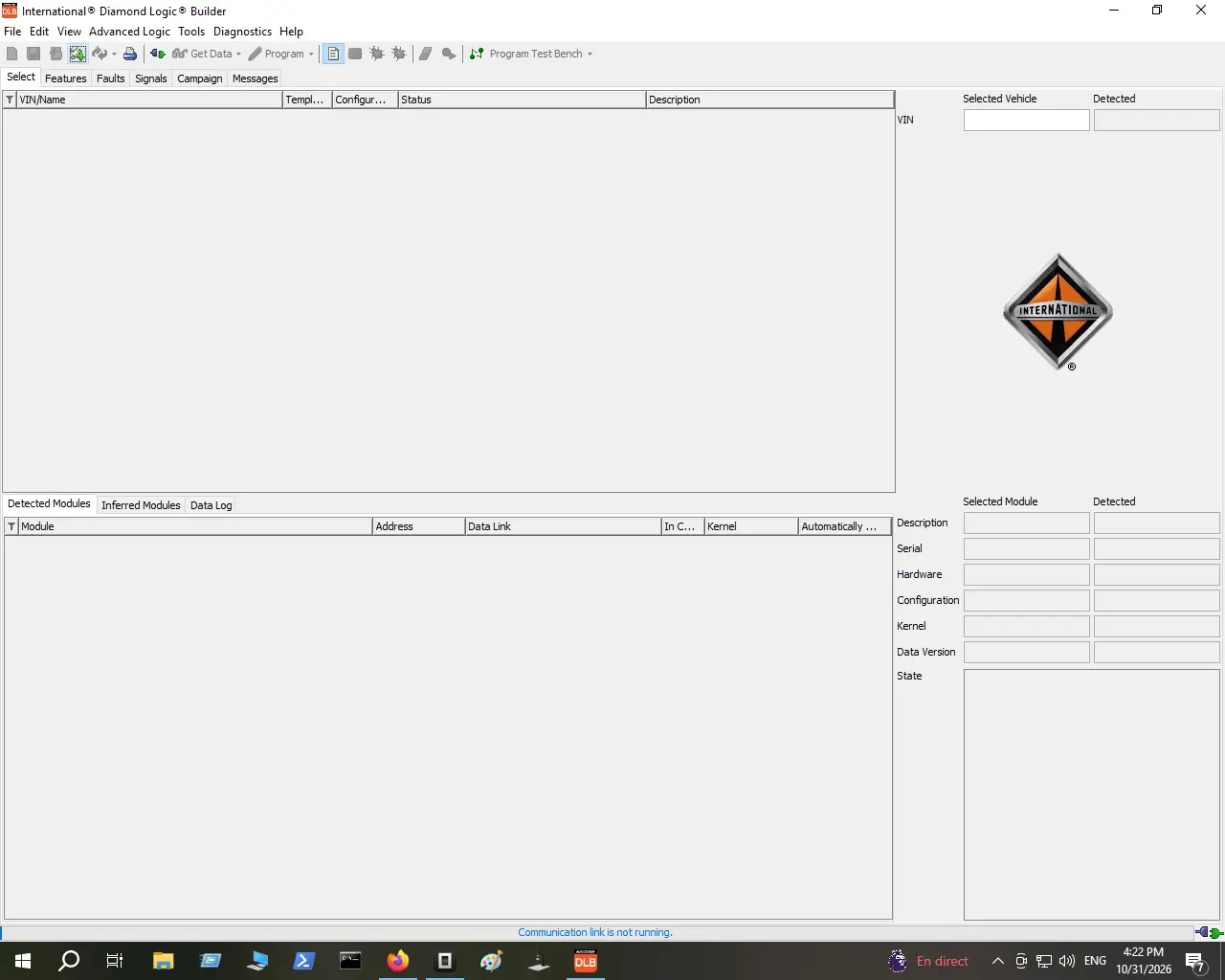
International Diamond Builder 2022 is the full Diamond Logic Builder (DLB) package for International and Navistar chassis work — delivered as a digital download for your own workshop PC. It is the desktop tool technicians open when they need to look past the fault code and into the bones of the truck: vehicle and module detection, feature checks, signal viewing and the programming workspace.
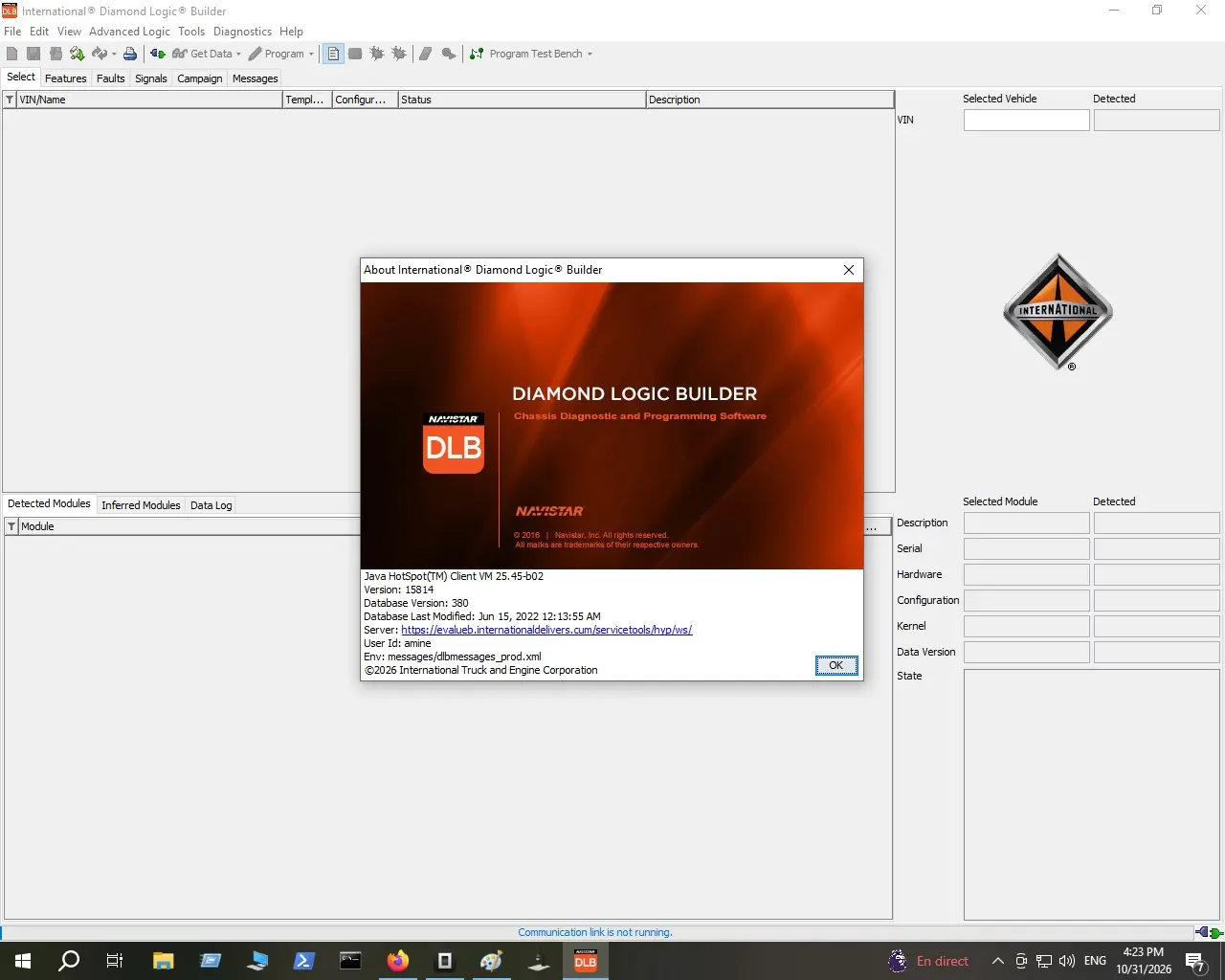
This build runs program version 15314 with database version 380, whose records date to June 15, 2022 (visible in the About screen, see the screenshots).
What the 2022 build contains
- Diamond Logic Builder application for Windows, running on its bundled Java runtime (Java HotSpot VM 25.45-b02 in our test install)
- 2022 service database (v380, database last modified June 15, 2022)
- Chassis diagnostic and programming workspace shown in the screenshots
What you can do at the bench
- Detect the truck: enter or read a VIN, and the window lists detected and inferred modules with address, data link, kernel and status columns
- Talk to a module: pick one and its description, serial, hardware, configuration, kernel, data version and state appear side by side
- Work the feature list: the Features, Faults, Signals, Campaign and Messages areas point you at the data that matters for your job
- Get data and program: the Get Data and Program toolbars — plus Program Test Bench — are on the main ribbon for advanced tasks
- Edit advanced logic: the Advanced Logic menu and its tool set are included as shown in the main window
Where it fits in your workshop
Professional truck mechanics, diesel technicians, fleet garages and commercial vehicle diagnostic specialists who service International trucks or Navistar-built chassis. Pair it with your preferred heavy-duty scan tool: DLB covers the chassis side while the scan tool covers the engine side.
Running requirements (as verified in our screenshots)
- Windows PC (desktop install as shown on Windows)
- Java runtime: bundled Java HotSpot client VM fills this role
- For live vehicle communication: a diagnostic data link connection to the truck — the status bar in the main window shows the communication-link state, and the About screen lists the official Navistar service-tools server as the program’s online endpoint
- Screen adjustments: at 1280×1024 the interface is comfortably readable, as in the gallery images
Installation and first steps
- Complete checkout — the download is a text file with your secure MEGA link, sent automatically after payment (unlimited re-downloads).
- Download the package (~654 MB) through the MEGA browser app or MEGAsync for a resumable transfer.
- Install on your workshop PC following the instructions inside the package and launch Diamond Logic Builder from the desktop icon.
- Connect your data link adapter, then use Select to bring the truck online; the Detected Modules area fills as modules respond.
Delivery
Digital download — no shipping, no discs. Payment clears and the download text file lands in your account; open it and follow the MEGA link whenever you need to reinstall.
Frequently asked questions
What exactly is Diamond Logic Builder?
It is Navistar’s own chassis diagnostic and programming software for International trucks — the About screen in our second screenshot identifies it as “Chassis Diagnostic and Programming Software” from International/Navistar.
Which vehicles does it cover?
The program is built for International and Navistar vehicles; its Select and module-detection screens identify the truck from the VIN. Exact model coverage follows the data files in your package, so treat the screenshots as your reference.
Do I need extra hardware?
For live work, yes: a diagnostic data link connection between your PC and the truck, as with any OEM tool. Without it the window still opens, but the status bar shows “Communication link is not running”, exactly as in our screenshot.
Does it need the internet?
The About screen lists an official Navistar service-tools server as the program’s server element. Keep that in mind if a task needs an online connection; hands-on fault and signal work happens over your data link.
Is this a license from the truck maker?
No. This is the complete software package for your workshop, sold as an independent offer (see “Full Unlocked” in the product name). It is not an International/Navistar subscription. The delivery text file explains what your download contains.
Related workshop software: browse the rest of our OEM diagnostic software collection or the broader Car & Trucks Diagnostics category.

Reviews
There are no reviews yet.