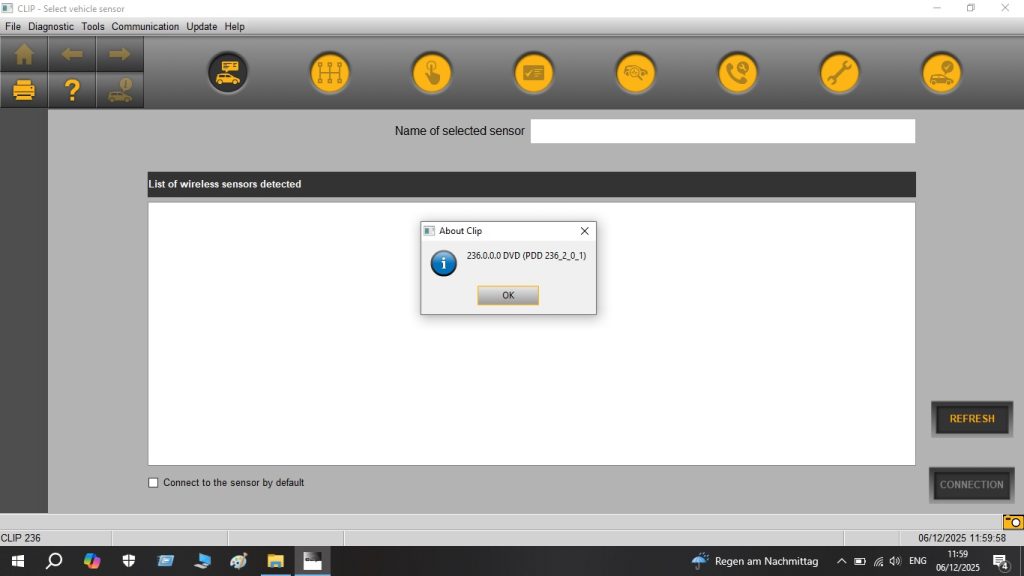
Renault CAN Clip 236 is the official OEM diagnostic software for the entire Renault Group, covering Renault passenger cars and light commercial vehicles, Dacia, and Nissan models sold in European markets. It is the only tool that provides complete factory-level access to Renault’s proprietary systems — the kind of access that dealers use every day for diagnostics, ECU programming, and configuration that aftermarket scanners simply cannot reach. This guide covers installation, compatible interfaces, and how to use CAN Clip effectively in an independent workshop.
What Is Renault CAN Clip?
CAN Clip is Renault’s dealer diagnostic platform, communicating via a proprietary CAN-based interface. It replaced older Renault diagnostic tools and has been the standard for Renault Group vehicles since the mid-2000s. Version 236 is among the most recent releases and covers Renault models up to 2024.
Key functions of CAN Clip 236
- Full system diagnostics — engine, gearbox, ABS, airbag, climate, BSI, instrument cluster, and all body electronics
- Fault code read/clear — including proprietary Renault fault codes not accessible via generic OBD2
- ECU programming — flash ECU firmware updates, UCH (BSI) programming, and immobilizer synchronisation
- Actuator tests — force individual components to verify operation without removal
- After-sales service functions — service interval reset, DPF regeneration, steering angle calibration, battery replacement
- Wiring diagrams — integrated electrical schematic viewer for selected models
Vehicle Coverage
| Brand | Models Covered | Coverage Depth |
|---|---|---|
| Renault | Clio, Megane, Laguna, Scenic, Kangoo, Trafic, Master, Zoe EV, Captur, Kadjar, Arkana | ✅ Full OEM |
| Dacia | Sandero, Logan, Duster, Lodgy, Dokker, Spring EV | ✅ Full OEM |
| Nissan (selected) | Micra, Juke, Qashqai, Note (European variants on Renault platforms) | ✅ Partial |
| Alpine | A110 | ✅ Full OEM |
System Requirements
- OS: Windows 7 32/64-bit or Windows 10 64-bit
- RAM: 4 GB minimum
- Storage: 20 GB free space
- Interface: Renault CAN Clip interface (OBD to CAN Clip connector)
Installation Guide
Step 1 — Prepare Your System
Disable Windows Defender real-time protection before installation. CAN Clip’s licence and database components are frequently flagged as threats. Run the installer as Administrator and ensure no other Renault diagnostic software is installed on the same machine.
Step 2 — Install CAN Clip
Launch the installer and follow the on-screen prompts. Select Complete Installation to include all vehicle databases and communication drivers. The installation takes 10–20 minutes. Do not interrupt it once the database extraction begins.
Step 3 — Install Interface Drivers
After the main application installs, connect your CAN Clip interface to USB. Windows will prompt for driver installation — allow it to proceed, or install the drivers manually from the CAN Clip installation directory under driversclip. Confirm the interface appears in Device Manager as “Renault CAN Clip” without error flags.
Step 4 — Launch and Configure
Open CAN Clip from the desktop. On the main screen, select Diagnosis and choose your vehicle brand. Connect the CAN Clip cable to the vehicle’s OBD2 port (typically under the dashboard, driver’s side) and turn the ignition to position II. CAN Clip reads the VIN automatically and populates the system list.
Common Issues and Fixes
Interface Not Detected
If CAN Clip reports the interface is not connected, confirm the USB driver is properly installed and the device appears in Device Manager. Try a different USB port and avoid USB hubs — CAN Clip requires a direct connection to the host controller.
“Vehicle Not Responding” on Connection
Check that the ignition is in position II (not III/start). Some Renault models require the vehicle to be in “Service mode” for certain ECU programming functions — consult the CAN Clip help documentation for the specific model.
UCH Programming Fails
UCH (BSI) programming requires the vehicle battery to be above 12.5V throughout the procedure. Connect a battery support unit before starting any ECU programming session. A voltage drop during UCH programming can require a dealer-level recovery procedure.
For workshops also servicing PSA Group vehicles (Peugeot, Citroën, DS), our Diagbox 9.129 guide covers the equivalent OEM tool for that platform. For VAG Group diagnostics, see our guide to ODIS Service 25 vs ODIS Engineering 19.
Get Renault CAN Clip 236
Instant digital download. Full vehicle database for Renault, Dacia, and Nissan. Ready to install without activation complications.



