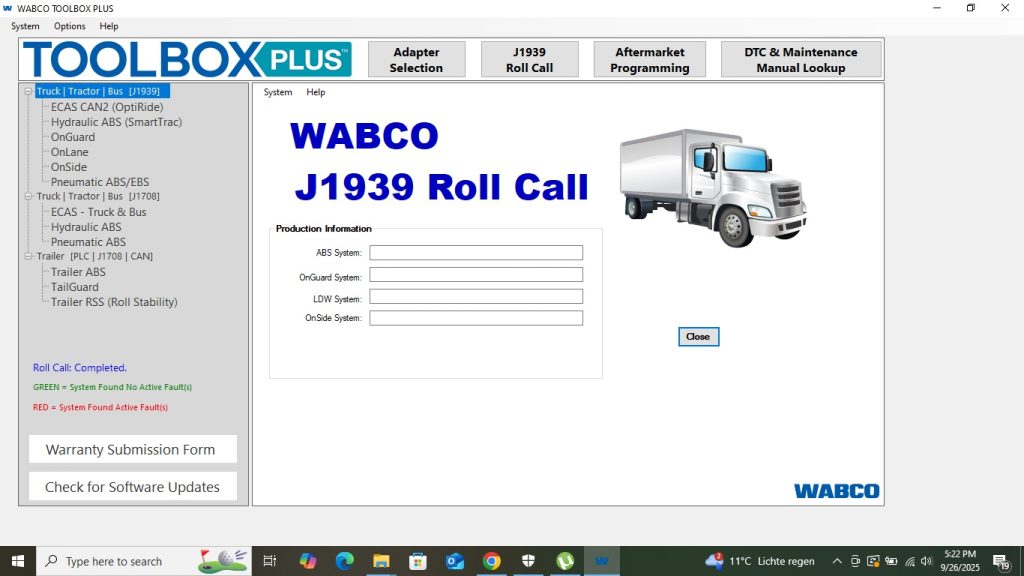
Getting Started with WABCO Toolbox 13.7
WABCO Toolbox covers ABS, EBS, ECAS, and collision avoidance systems — more specialized than a general engine diagnostic tool, but essential for any shop doing brake or suspension work on modern trucks. This guide walks you through your first session in plain terms, the way brake specialists explain it to new technicians on forums and in shop training.
Before You Start — Checklist
- WABCO Toolbox 13.7 installed, license activated
- Adapter connected: Nexiq USB Link 2/3, DPA5, or WABCO WDC
- Adapter drivers installed in Device Manager — no yellow marks
- Truck: parking brake set, parked safely, key OFF initially
- If diagnosing trailer: ISO 7638 trailer cable connected to trailer nose
Step 1 — Connect the Adapter to the Truck
Locate the J1939 OBD port on the tractor. On Freightliner Cascadia it’s under the dashboard near the A-pillar. Plug in your Nexiq USB Link. Connect USB end to laptop. If you’re also connecting to a trailer, plug the ISO 7638 cable into the 7-pin trailer socket on the front trailer nose.
Step 2 — Open WABCO Toolbox and Connect
- Open WABCO Toolbox 13.7 (run as Administrator)
- Go to Options → Communication → select your adapter (Nexiq USB Link, DPA5, or WDC)
- Turn truck key to ON position (ignition on, engine off is fine)
- Click Connect in the toolbar
- WABCO Toolbox scans for WABCO ECUs on the J1939 bus and ISO 7638 (if trailer connected)
- Vehicle tree appears on the left: ABS (tractor), ECAS, OnGuardACTIVE, Trailer ABS (if connected)
Step 3 — Read ABS Fault Codes
- Click ABS in the vehicle tree
- Select Fault Codes tab
- Review Active faults (red) and Inactive faults (grey history)
- Click each fault to expand: WABCO code, J1939 SPN/FMI, description, occurrence count, freeze frame data
- Note every active fault before doing any work — freeze frame shows the conditions when the fault triggered (speed, pressure, temperature)
Step 4 — Run Live Data to Verify Wheel Speed Sensors
After reading fault codes, go to Live Data tab in the ABS section. You’ll see real-time values for:
- Wheel speed (km/h or mph) for each sensor position (FL, FR, RL, RR)
- Brake chamber pressure (PSI) at each wheel
- ABS modulator valve states
With the truck stationary and engine running, all wheel speeds should read 0. Have someone slowly roll the truck forward (or spin a wheel by hand) while you watch live data — a working sensor will show speed; a failed sensor stays at 0.
Step 5 — Run Actuator Tests
WABCO Toolbox’s actuator tests let you command valves to open/close and verify they respond:
- Go to Actuator Tests tab
- Select a modulator valve (e.g., Front Left ABS valve)
- Click Activate — you’ll hear the valve cycle (click/thunk sound from the brake chamber area)
- If the valve is silent or WABCO Toolbox shows an error during activation, the valve or its wiring is faulty
Step 6 — ECAS Suspension Check (if equipped)
Click ECAS in the vehicle tree. For a basic check:
- View live data: height sensor readings, air pressure, leveling valve states
- If the truck is sitting level and the height sensors show uneven readings, calibration or sensor replacement is needed
- Full ECAS calibration is a separate procedure — only run it after all physical repairs are complete (new air bags, new sensors, etc.) and the air system is fully charged (120 PSI minimum)
Step 7 — Diagnose Trailer ABS (if connected)
- Click Trailer ABS in the vehicle tree
- If WABCO Toolbox found a trailer ECU, it appears here. If not, check your ISO 7638 cable connection
- Read fault codes the same way as tractor ABS
- Common trailer ABS issues: wheel speed sensor contamination (road salt/grease), loose connectors at the ECU box on the trailer frame, corroded ISO 7638 pin contacts
Step 8 — Clear Fault Codes
Only after repairs are confirmed:
- Fault Codes tab → Click Clear Faults
- Reconnect and verify no new faults appear
- Run a short test drive (or manually spin wheels) to confirm wheel speed sensors are reading correctly and no ABS faults return
Common Beginner Mistakes
- Starting ECAS calibration with low air pressure — Always wait for full system pressure (120+ PSI) before calibrating
- Clearing codes before diagnosing the root cause — ABS faults return within one wheel rotation if the sensor or valve is still faulty
- Forgetting to check trailer ABS — Many brake complaints originate in trailer ABS; always connect the trailer when diagnosing a brake system complaint
- Disconnecting adapter while WABCO Toolbox is in actuator test mode — Always stop all tests and click Disconnect in software before unplugging
Conclusion
WABCO Toolbox 13.7 is straightforward once you understand the vehicle tree structure: tractor ABS → ECAS → OnGuard → trailer ABS. Each system has its own fault codes, live data, and actuator tests. For detailed fault code explanations, see our error codes guide. For quick answers, check the FAQ.