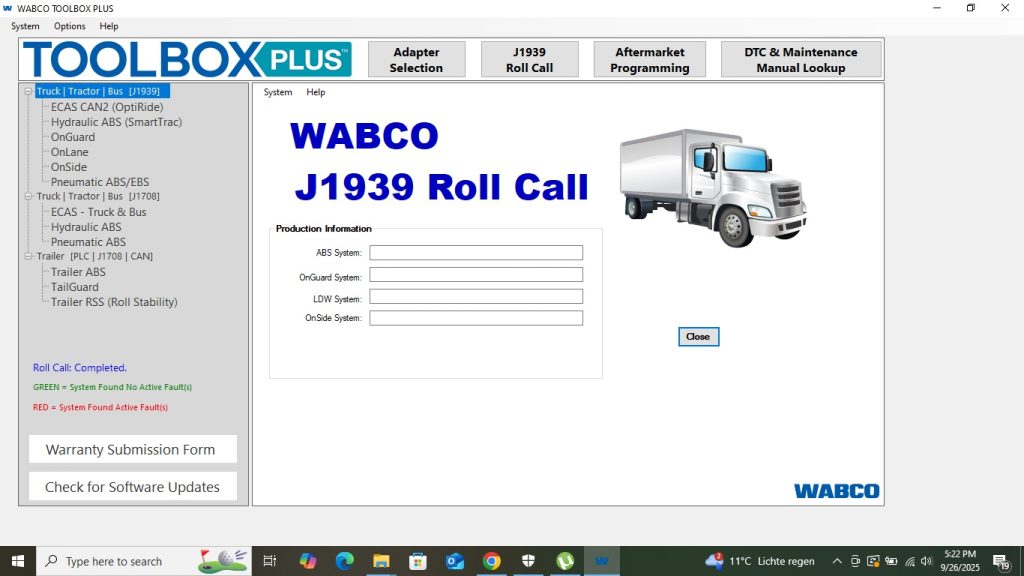
WABCO Toolbox Plus 13.7.1 is the official diagnostic and programming software for WABCO braking and stability systems found on heavy-duty trucks, trailers, and buses worldwide. ABS, EBS (Electronic Braking System), ECAS (Electronically Controlled Air Suspension), and HPB (Hydraulic Power Brake) systems all require WABCO Toolbox for programming and diagnosis — no other tool provides the same level of access to these safety-critical systems. This guide covers installation, compatible interfaces, and how to use Toolbox effectively in a workshop environment.
What Is WABCO Toolbox Plus?
WABCO Toolbox is the manufacturer’s diagnostic and configuration software for WABCO electronic systems on commercial vehicles. Version 13.7.1 is one of the most complete releases, covering the full range of WABCO products across virtually all major truck, trailer, and bus brands.
Systems covered by WABCO Toolbox 13.7.1
- ABS (Anti-lock Braking System) — diagnostic, configuration, and sensor calibration for all WABCO ABS generations
- EBS (Electronic Braking System) — full access to brake force distribution, retarder integration, and EBS parameter configuration
- ECAS (Electronically Controlled Air Suspension) — calibration, height adjustment programming, and fault diagnosis
- HPB (Hydraulic Power Brake) — diagnostics and programming for WABCO hydraulic brake systems
- TPMS (Tyre Pressure Monitoring) — sensor registration and system configuration
- OptiLink / OnGuard — collision mitigation system access on supported platforms
- PIN calculation — generate security PINs for WABCO ECU access on supported systems
Vehicle Coverage
| Category | Brands/Systems |
|---|---|
| Trucks (tractor units) | Volvo, Scania, MAN, Mercedes, DAF, Iveco, Renault Trucks, Kenworth, Peterbilt |
| Trailers | All trailers with WABCO ABS/EBS — Schmitz, Krone, Kogel, Wabash, Utility |
| Buses & coaches | Volvo, Mercedes CapaCity, MAN Lion’s, VDL, Solaris |
| Construction | Selected heavy construction vehicles with WABCO braking systems |
Compatible Interfaces
WABCO Toolbox supports multiple interface types:
- WABCO Diagnostic Controller (WDC) — genuine WABCO interface, best compatibility for all Toolbox functions including PIN calculation
- Nexiq USB Link 3 — supports J1939 and K-Line protocols required by older WABCO systems
- Generic J2534 interface — compatible for CAN-based WABCO systems; K-Line systems require dedicated adapters
Installation Guide
System Requirements
- Windows 10 64-bit or Windows 7 64-bit
- 4 GB RAM minimum
- 5 GB free disk space
Step 1 — Install Prerequisites
WABCO Toolbox requires specific Visual C++ and .NET Framework versions. Install the prerequisites package included with Toolbox before running the main installer. Skipping this step causes Toolbox to install but fail to launch.
Step 2 — Run the Toolbox Installer
Launch the Toolbox Plus installer as Administrator. Select Full Installation to include all system modules and the complete ECU database. The installation takes 5–15 minutes.
Step 3 — Configure Interface
Open Toolbox and navigate to Settings → Interface. Select your interface type from the dropdown and confirm the COM port or USB assignment. Click Test to verify communication before connecting to a vehicle.
Step 4 — Connect to Vehicle
Connect the interface to the vehicle’s 9-pin Deutsch port (trucks) or the ISO 7638 connector on trailer ABS systems. Turn the ignition to On and launch Toolbox. Select Automatic System Detection — Toolbox will scan all available CAN and K-Line networks and identify every WABCO ECU present.
Common Issues and Fixes
ECU Not Found on Trailer
Trailer ABS systems connect via the ISO 7638 (7-pin) electrical connector, not the truck’s OBD2 port. Ensure the trailer is connected to the tractor unit and the ISO 7638 is properly mated before launching Toolbox.
ECAS Calibration Fails
ECAS height calibration requires the vehicle to be on a level surface with the air suspension at ride height. Ensure air pressure is sufficient (above 6.5 bar) and all axles are within normal ride height range before starting the calibration procedure.
PIN Calculation Not Available
PIN calculation for locked ECUs requires the WABCO Diagnostic Controller (WDC) — generic J2534 adapters do not support this function. Ensure you are using the correct interface for PIN-protected systems.
For complete truck diagnostic coverage beyond braking systems, our JPRO 2025 v2 guide covers brand-agnostic multi-system diagnostics. For Detroit Diesel engine diagnostics on the same trucks, see our DDDL 8.19 SP1 guide.
Get WABCO Toolbox Plus 13.7.1
Instant digital download. Full system coverage for ABS, EBS, ECAS, and HPB on trucks, trailers, and buses.



